


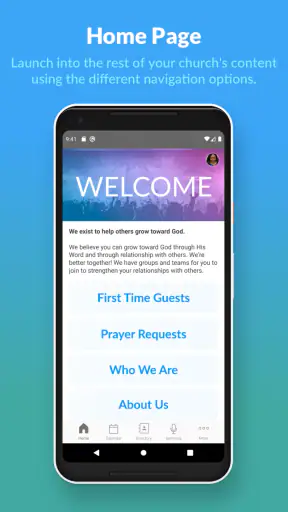
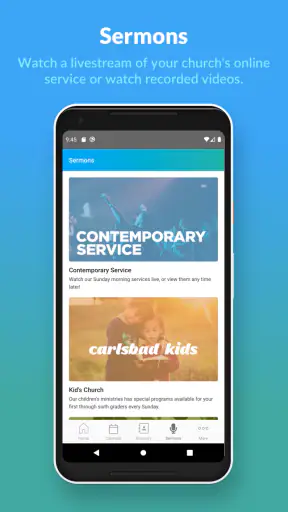
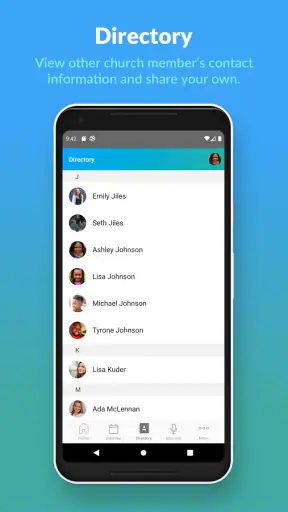
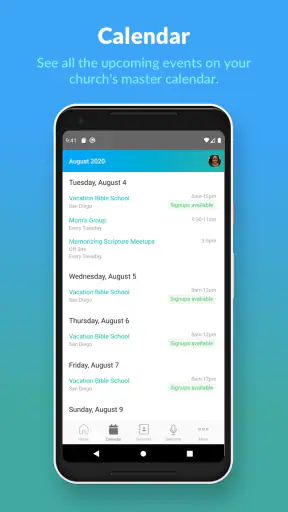
Church Center is the kind of lifestyle app that makes sense when your church already uses Planning Center to organize its community. I found its main value in one simple capability: it brings church-related information and participation into a single mobile space instead of leaving people to search through separate messages, paper notices, calendars, and sign-up pages.
That focus is important. This is not a general social network, a devotional reader, or a replacement for every church website. Its purpose is more practical: helping congregants stay connected with their church. In my experience, that makes it most useful between services, when I want to check what is happening, respond to an invitation, or keep track of something I have already joined.
Church Center is free, aimed at Everyone, and developed by Planning Center. It has been available since November 26, 2018, and its current version is 2026.8.24. The app supports Android 7.0 and later, so it remains accessible on many older Android phones. Its average rating is 4.4 from around 4.8 thousand ratings, with over 1 million installs, which suggests that it has become a familiar tool for many church communities.
One place for church participation
The strongest idea here is not simply displaying information. It is connecting information with action. A church announcement is easy to overlook when it appears as a notice on a wall or disappears in a busy group chat. Inside Church Center, the same kind of information can become something I can follow up on: I can look at an activity, decide whether it applies to me, and take the next step from the same general environment.
That reduces a surprisingly common problem. Church life often involves several small decisions rather than one large task: finding the time of a gathering, checking whether a group is meeting, remembering an event, or confirming involvement. The app is valuable when it turns those loose details into a routine I can revisit from my phone.
The benefit depends on the church’s setup. Church Center is not an independent directory that automatically knows every congregation or fills itself with universal content. It works as a connection point for a church using Planning Center. That means the quality of the experience follows the quality of the information the church maintains. If the church keeps its schedules and participation details current, the app can feel very convenient. If updates are irregular, the app cannot fix that organizational gap.
This is the first trade-off I would explain to a friend: the app is useful because it is tied to a real church community, but that same connection means it is not equally useful for everyone. Someone looking for broad religious content, inspirational reading, or a way to discover unfamiliar churches will probably find a different type of app more suitable.
What changes in everyday use
The practical difference appears when I stop treating church information as something I only check on Sunday. A phone-based hub makes it easier to return to details during the week, when plans change and questions arise. I can think of it as a bridge between the church’s organization and my own schedule.
For example, imagine a parent who hears about a midweek activity after a service but does not have time to ask every question. Later, at home, that person can use Church Center to review the relevant church information and decide whether to participate. If the event requires a response, the important advantage is having the context and the next action close together rather than relying on memory.
That workflow is more useful than simply copying announcements into an app. It gives church members a place to return to when they are ready to act. I also think it helps people who are new to a congregation, because they may not yet know which person to contact or which printed notice contains the answer. A central mobile starting point lowers that initial friction.
There is also a quiet organizational benefit. Instead of asking different volunteers the same basic questions, congregants can first check the information available through the app. That does not replace personal contact, and it should not; church life is relational. But it can reserve conversations for questions that genuinely need a person rather than a repeated search for times, details, or participation instructions.
A realistic weekly routine
My preferred way to use an app like this would be in short visits rather than constant checking. At the beginning of the week, I would open Church Center to see what matters to me. Before leaving for an activity, I would use it as a quick reminder of the relevant details. Afterward, I would return only when I needed to follow up or prepare for the next commitment.
That pattern matters because the app’s strength is not entertainment. It does not need to occupy my attention all day. Its job is to make church participation easier at the moment I need information. People who expect a busy feed, endless discovery, or a large public conversation may interpret that focused design as limited. I see it more as a tool that works best when it stays in the background until church-related planning becomes relevant.
A useful habit is to treat the app as a starting point, not as a substitute for checking important details with the church when circumstances are unclear. Schedules can change, and a mobile listing may not answer a personal question. When something affects childcare, travel, accessibility, or a special arrangement, I would still contact the church directly instead of assuming the app contains every nuance.
That is one of the less obvious lessons of using Church Center: centralization saves time, but it can also encourage overconfidence. The app can show me what the church has organized for members; it cannot understand my individual situation unless the available information and communication options cover it.
Where the app is especially helpful
Church Center makes the most sense for people who are already connected to a participating church and want a dependable mobile doorway into that community. It can be particularly helpful for newcomers, families managing several commitments, volunteers who need to keep church activities in view, and members who do not want to depend on paper handouts or scattered conversations.
For a newcomer, the central benefit is orientation. The first weeks in a church often involve learning names, schedules, groups, and routines all at once. A single app can make that learning curve less intimidating, especially when I am trying to remember details after meeting many people in a short time.
For a family, the value is less about novelty and more about reducing mental load. Parents often coordinate multiple calendars and need to make decisions quickly. Having church participation connected to a familiar phone workflow can make it easier to decide what belongs in the family’s week and what does not.
For a volunteer, the app can serve as a convenient reference point between conversations. It is not a replacement for team communication when a role requires detailed coordination, but it can reduce the need to remember every announcement or search through old messages to find the basic context.
Older Android users also have a practical reason to consider it. Support beginning with Android 7.0 means the app is not restricted to only recent devices. I would still expect the experience to vary with phone performance and the church’s configuration, but the stated minimum makes it more approachable for households that keep phones for several years.
What it does better than usual alternatives
The usual alternatives each solve only part of the problem. A church website may provide public information, but it can be less convenient for returning members who need a mobile-first place to stay connected. Email can deliver announcements, but important details become buried as the inbox grows. Group messaging is fast, yet conversations can mix urgent questions with unrelated replies. Paper notices are visible at the right moment but easy to misplace.
Church Center’s advantage is the combination of church context and repeat access. I am not merely reading a broadcast message; I am returning to a place designed around participation in a specific church community. That makes it more useful for ongoing involvement than a general calendar or a collection of bookmarks.
Still, the alternatives can be better in particular situations. A website is preferable when I am researching a church before joining it, because public visitors may need information without setting up a member-oriented relationship. Email is better for a long explanation that I may need to search later. A messaging service is better when a small team needs a rapid back-and-forth conversation. Church Center works best in the middle: structured enough to organize participation, but not intended to replace every communication channel.
I would also avoid assuming that one app automatically simplifies everything. If a church uses several unrelated tools, I may still have to move between them. Church Center can be the central doorway without becoming the entire digital life of the congregation. That distinction helps set realistic expectations before installing it.
Small frictions worth understanding
The first friction is dependence on the church. A congregation has to use Planning Center in a way that supports its members. If the information is incomplete, outdated, or organized in a way that does not match how people actually participate, the app may feel like another place to check rather than the one place that solves the problem.
The second is that centralization can expose differences between public and member-focused information. A person visiting for the first time may not immediately understand what the app is for or how it relates to a particular church. I would recommend approaching it with a specific church connection in mind, rather than installing it simply because the name sounds broadly useful.
The third is the boundary between structured information and personal help. The app can make routine details easier to find, but it cannot replace a pastor, volunteer coordinator, group leader, or church office when the question is sensitive or individual. Someone deciding whether the app is suitable should see it as a practical companion to community, not as the community itself.
There is also a behavioral trade-off. Once information is centralized, I may rely on the app and pay less attention to spoken announcements or personal invitations. That can be convenient, but it may also make church participation feel more administrative if I use only the digital layer. My best experience would be to use Church Center for logistics and real people for relationship, clarification, and encouragement.
Who should install it
I would recommend Church Center to anyone whose church uses Planning Center and wants church participation to be easier to manage from a phone. It is a strong fit if I regularly forget event details, need to coordinate family commitments, or want a consistent place to return to during the week. The free price also removes the usual barrier to trying it, while the Everyone age rating makes it broadly approachable for households.
I would be more cautious if I were not connected to a participating church. In that situation, the app may not offer the discovery or general spiritual content I am looking for. I would also choose another tool if my main need were private team chat, long-form study, broad event discovery, or a public church directory. Those are different jobs, and forcing Church Center to perform them would lead to disappointment.
For churches, the app’s real value is consistency. Members are more likely to use a central tool when it reflects the way the church actually organizes activities and communicates. For individuals, the value is convenience with a condition: I need to trust the church’s information and remember that some questions still belong in a conversation.
After using it as a church connection tool, my opinion is positive but deliberately practical. Church Center does not try to be everything. Its best contribution is making the ordinary steps of church involvement easier to find and revisit. If your church already relies on Planning Center, this is a sensible first place to look for church-related participation from your phone.
The current version, 2026.8.24, continues that focused role rather than changing the basic reason to use it. I would install it when I want less scattered church administration in my week, while keeping my expectations grounded: it can organize access to a community, but the quality of that experience still depends on the community behind it.


